Virtuoso SaaS Managed Service Buyer Container Shell Access Runbook
This runbook documents buyer shell access for Virtuoso SaaS Single Server tenant instances.
Access Model
Virtuoso SaaS instances run as ECS Fargate tasks. Buyers do not SSH to an EC2 host. Shell access is provided through AWS ECS Exec into the buyer-owned Virtuoso container.
For each provisioned Marketplace-backed instance, the tenant stack creates a per-instance IAM role in the seller account. The role trust policy allows only the buyer AWS account associated with that Marketplace agreement to assume it, and requires the instance customer_id as the STS ExternalId.
The role is scoped to the instance ECS cluster and task ARN pattern. It does not grant access to other tenant clusters or containers.
Where To Find Access Details
Open the Virtuoso SaaS Buyer Portal.
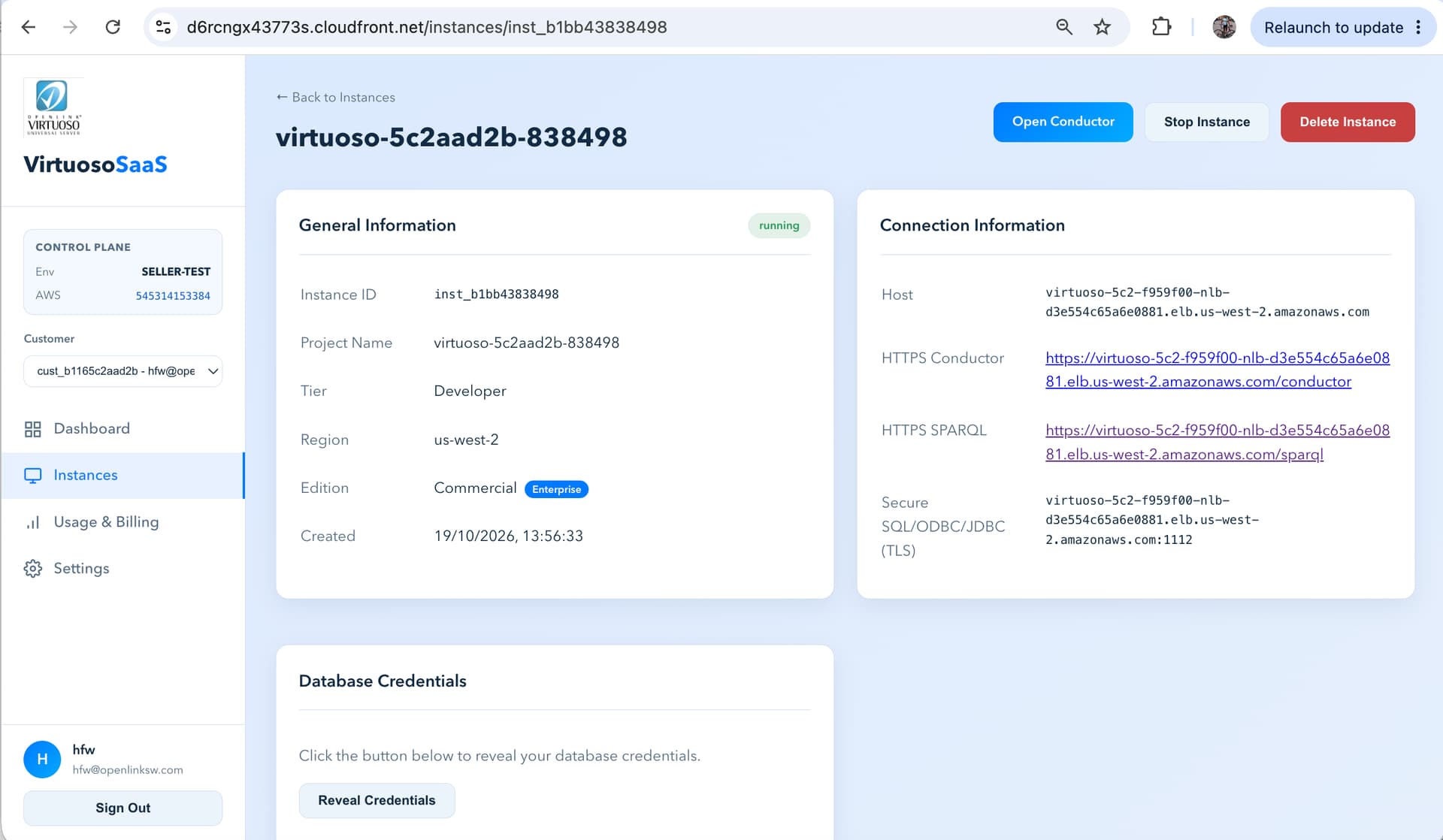
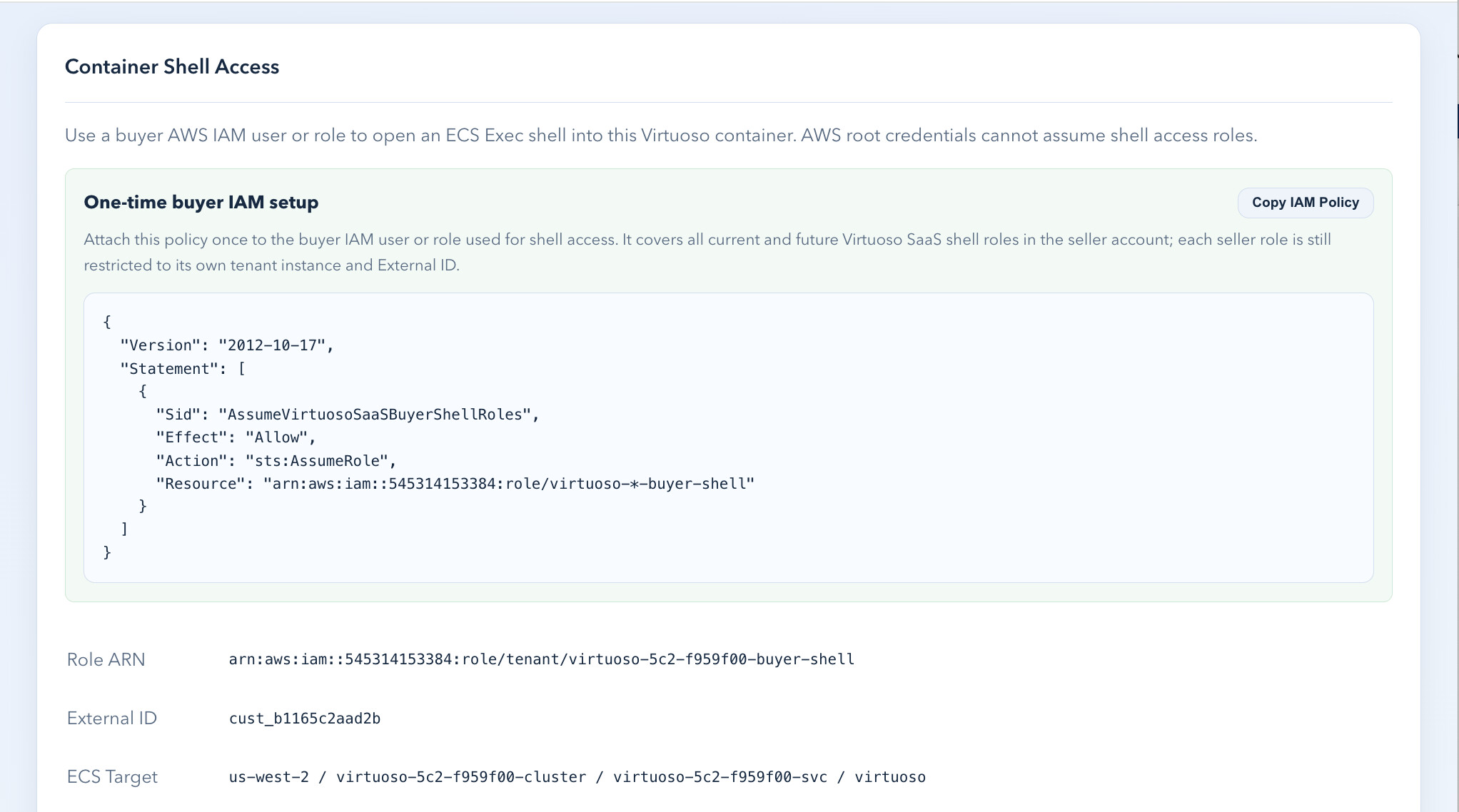
From the instance detail page goto the Container Shell Access section.
Buyer Prerequisites
The buyer must use AWS credentials for the buyer AWS account associated with the Marketplace agreement.
The buyer must use an IAM user or IAM role. AWS root credentials cannot assume the seller shell-access role; AWS returns Roles may not be assumed by root accounts.
The same buyer IAM user or role can be used for multiple Marketplace agreements and instances. Attach the buyer-side setup policy once, then use the per-instance role ARN and ExternalId shown in the portal.
Recommended buyer-side IAM policy:
{
  "Version": "2012-10-17",
  "Statement": [
    {
      "Sid": "AssumeVirtuosoSaaSBuyerShellRoles",
      "Effect": "Allow",
      "Action": "sts:AssumeRole",
      "Resource": "arn:aws:iam::545314153384:role/virtuoso-*-buyer-shell"
    }
  ]
}
The wildcard only allows the buyer IAM principal to request role assumption. The seller-side trust policy still restricts each role to the buyer AWS account and the required ExternalId, and the role permissions are scoped to one tenant ECS cluster/task.
The workstation must have:
| Tool | Purpose |
|---|---|
| AWS CLI v2 | Assume role and run ECS Exec |
| Session Manager plugin | Required by aws ecs execute-command |
Buyer Shell Commands
Use the exact script shown in the buyer portal. It intentionally avoids jq so it works on a standard shell with AWS CLI v2.
#!/usr/bin/env bash
set -euo pipefail

ROLE_ARN="arn:aws:iam::<seller-account-id>:role/<instance-buyer-shell-role>"
EXTERNAL_ID="<customer-id>"
REGION="<tenant-region>"
CLUSTER="<ecs-cluster-name>"
SERVICE="<ecs-service-name>"
CONTAINER="virtuoso"
SESSION_NAME="virtuoso-shell-<instance-id>"
CREDS_FILE="/tmp/<instance-id>-shell-creds.json"

unset AWS_ACCESS_KEY_ID AWS_SECRET_ACCESS_KEY AWS_SESSION_TOKEN

aws sts assume-role \
  --role-arn "$ROLE_ARN" \
  --role-session-name "$SESSION_NAME" \
  --external-id "$EXTERNAL_ID" \
  --query 'Credentials.[AccessKeyId,SecretAccessKey,SessionToken]' \
  --output text > "$CREDS_FILE"

read AWS_ACCESS_KEY_ID AWS_SECRET_ACCESS_KEY AWS_SESSION_TOKEN < "$CREDS_FILE"
export AWS_ACCESS_KEY_ID AWS_SECRET_ACCESS_KEY AWS_SESSION_TOKEN

TASK_ARN=$(aws ecs list-tasks \
  --region "$REGION" \
  --cluster "$CLUSTER" \
  --service-name "$SERVICE" \
  --desired-status RUNNING \
  --query 'taskArns[0]' \
  --output text)

if [ -z "$TASK_ARN" ] || [ "$TASK_ARN" = "None" ]; then
  echo "No running ECS task found for service $SERVICE"
  exit 1
fi

aws ecs execute-command \
  --region "$REGION" \
  --cluster "$CLUSTER" \
  --task "$TASK_ARN" \
  --container "$CONTAINER" \
  --interactive \
  --command "/bin/bash"
When switching between instances, unset temporary credentials first or rerun the generated script from a shell using the original buyer IAM user/role credentials.
After finishing a shell session, or before switching back to another AWS account/profile, clear any temporary credentials exported by the script:
unset AWS_ACCESS_KEY_ID AWS_SECRET_ACCESS_KEY AWS_SESSION_TOKEN AWS_PROFILE
If this is not done, later AWS CLI commands can continue using the temporary seller-account assumed-role credentials. Once those temporary credentials expire, AWS CLI calls fail with ExpiredToken until the environment variables are cleared or a new shell is opened.
Backup & Recovery
The Buyer Portal instance detail page also includes Backup & Recovery. It generates a script that uses the same ECS Exec access model to call Virtuoso backup_online() inside the tenant container, then starts a scoped Fargate backup-sync task to copy the backup files to durable S3 storage. See the Virtuoso Online Backup and Recovery Runbook.
Operational Notes
Existing instances created before this feature will not automatically have a buyer shell role until their tenant stack is reapplied or backfilled.
Terminating an instance destroys the per-instance role as part of the tenant OpenTofu stack.
This access intentionally gives the buyer an interactive shell inside their Virtuoso container. That means the buyer can inspect files, environment, mounted storage, and the Virtuoso installation within their own tenant container.
Validation Record
Buyer container shell access was validated end-to-end on 2026-07-08/2026-07-09 using a newly provisioned Seller-Test Marketplace agreement.
| Field | Value |
|---|---|
| Buyer AWS account | 135978535891 |
| Buyer IAM user | arn:aws:iam::135978535891:user/hwilliams |
| Customer ID | cust_0958fd96823c |
| Instance ID | inst_a23e06697147 |
| Project | virtuoso-fd96823c-697147 |
| Region | us-west-2 |
| Shell role | arn:aws:iam::545314153384:role/virtuoso-fd9-10996cd-buyer-shell |
| ExternalId | cust_0958fd96823c |
| ECS cluster | virtuoso-fd9-10996cd-cluster |
| ECS service | virtuoso-fd9-10996cd-svc |
The buyer IAM user successfully assumed the per-instance seller role:
{
  "UserId": "AROAX552BUOUCI3YMD5XM:virtuoso-inst-a23e06697147",
  "Account": "545314153384",
  "Arn": "arn:aws:sts::545314153384:assumed-role/virtuoso-fd9-10996cd-buyer-shell/virtuoso-inst-a23e06697147"
}
The portal-generated script opened an ECS Exec session into the Virtuoso container and confirmed the server process:
root@ip-10-0-10-218:/opt/virtuoso/database# ps -ef | grep virt
virtuoso       1       0  0 16:50 ?        00:00:08 virtuoso-iodbc-t -f