What is the Shapes Constraint Language (SHACL)?
SHACL (Shapes Constraint Language) is a W3C-standardized language used to declaratively define and validate the structure—or “shape”—of data in RDF graphs.
It enables two key functions:
- Shape Validation: Verifying that RDF-based Entity-Relationship Graphs conform to expected structural patterns.
- Rule Execution: Leveraging SPARQL
CONSTRUCTqueries as inference rules—similar to how SPIN (SPARQL Inferencing Notation) works.
Why is SHACL Important?
SHACL provides a mechanism to test and enforce the structural integrity of data in Knowledge Graphs. By using declarative constraints, SHACL ensures that:
- Entities have the correct types and relationships.
- Data conforms to expected class structures and property usage patterns.
How is SHACL Used in Virtuoso?
Virtuoso implements SHACL support via built-in functions that compile and execute shape validations against RDF data.
Step 1: Compile SHACL Shapes
The DB.DBA.SHACL_COMPILE_SG function compiles SHACL shape definitions into stored procedures and returns the name of the generated validator procedure.
CREATE FUNCTION DB.DBA.SHACL_COMPILE_SG (
    IN sg_list ANY ARRAY,
    IN proc_name_pattern VARCHAR := NULL
) RETURNS VARCHAR
Function Parameters:
sg_list - an array of IRIs denoting graphs comprising SHACL Shape Definitions
proc_name_pattern - an optional string that is placed inside names of created stored procedures.
Step 2: Validate SHACL Shapes
This function takes the SHACL compiled shape graph procedure generated with the DB.DBA.SHACL_COMPILE_SG(...) procedure and validates it against the required instance and ontology data.
CREATE PROCEDURE DB.DBA.SHACL_proc_name_pattern_VALIDATE (
in specific_targets any array,
in dg_list any array,
in onto_list any array,
in vrg_iri any array)
Function Parameters:
specific_targets – is NULL if everything in data graphs should be
validated, otherwise it should be a list of subjects to validate.
dg_list – a list of IRIs (or IRI_IDs) of data graphs to be validated.
If more than one graph is specified then a slow non-compiler version will
be used. If exactly one graph is specified then a much faster compiled
SHACL Validator is used.
onto_list – a list of IRIs (or IRI_IDs) of ontology graphs. These
graphs provide information about classes and subclasses etc., but these triples aren’t validation targets.
vrg_iri – an IRI for resulting validation report graph. It would be as follows with regards to Shape Validation.
Step 3: Query Validation Results
The Validation RDFnGraph (vrg_iri) generated in the previous step can be queried to view the results of the SHACL Validation.
select * from <vrg_iri> { ?s ?p ?o }
Usage Example
Given the following:
- SHACL Shape Graph
http://shirtShape.example
@prefix sh: <http://www.w3.org/ns/shacl#> .
@prefix rdfs: <http://www.w3.org/2000/01/rdf-schema#> .
@prefix myData: <http://example.org/myData#> .
@prefix COLOR: <http://example.org/color#> .

myData:ShirtShape
    a sh:NodeShape ;
    rdfs:label "Shirt"@en ;
    sh:targetClass myData:Shirt ;

    sh:property [
        sh:name "has Color"@en ;
        sh:path COLOR:hasColor ;
        sh:class COLOR:Color ;
        sh:minCount 1 ;
        sh:maxCount 1 ;
        sh:nodeKind sh:IRI ;
        sh:message "Validation failed: There must be exactly one Color."@en ;
    ].
- Instance Data Graph
https://myData
@prefix myData: <http://example.org/myData#> .
@prefix COLOR: <http://example.org/color#> .

myData:shirt1 rdf:type myData:Shirt.
myData:shirt1 COLOR:hasColor COLOR:blue.
- Ontology data graph
urn:my-color-ontology
@prefix COLOR: <http://example.org/color#> .
@prefix rdfs: <http://www.w3.org/2000/01/rdf-schema#> .

COLOR:blue a COLOR:Color .
The SHACL validation can then be performed as follows:
- Compile SHACL Shape into Validator Function
SELECT DB.DBA.SHACL_COMPILE_SG(
    VECTOR('http://shirtShape.example'),
    'Shirt_VALIDATOR'
);
- Run the SHACL Validation
CALL DB.DBA.SHACL__Shirt_VALIDATOR__VALIDATE(
    NULL,                        -- Validate all instances
    VECTOR('https://myData'),    -- Dataset to be validated
    VECTOR('urn:my-color-ontology'), -- Color ontology
    'http://shirt-validation-report-graph' -- Where to store validation results
);
- Query Validation Results
SQL> sparql select * from <http://shirt-validation-report-graph> { ?s ?p ?o };
s                                                                                 p                                                                                 o
LONG VARCHAR                                                                      LONG VARCHAR                                                                      LONG VARCHAR
_______________________________________________________________________________

http://www.openlinksw.com/schemas/virtrdf#ValidationReport                        http://www.w3.org/1999/02/22-rdf-syntax-ns#type                                   http://www.w3.org/ns/shacl#ValidationReport
http://www.openlinksw.com/schemas/virtrdf#ValidationReport                        http://www.w3.org/ns/shacl#conforms                                               1

2 Rows. -- 0 msec.
SQL>
SHACL Demo Form Page
Virtuoso provides a SHACL Demo Form Page UI by default at URL http://{cname}:{port}/shacl-default of the Virtuoso instance, enabling the SHACL validation to be performed via the UI rather then command line as per screenshot:
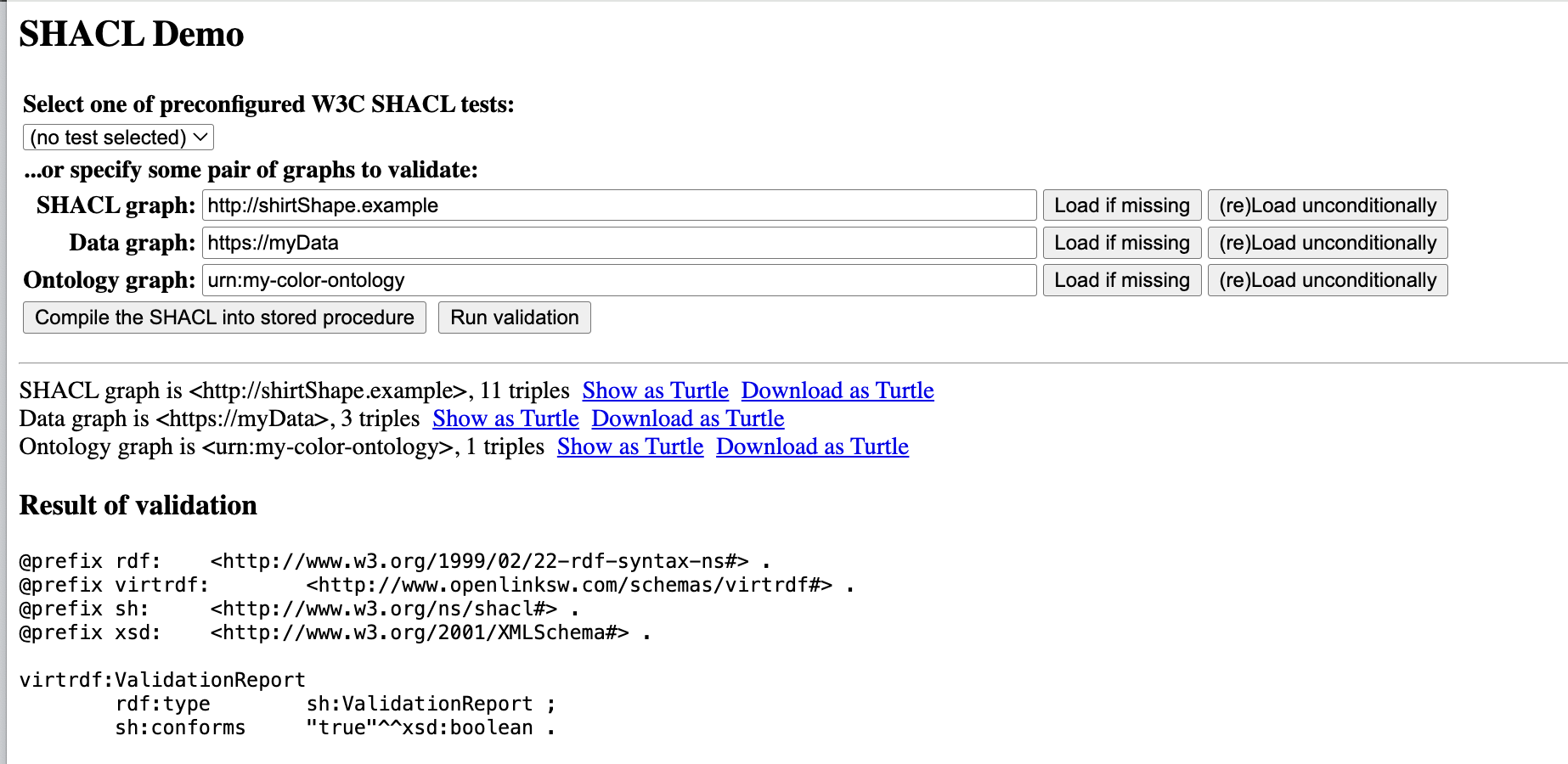
By pointing to the relevant SHACL Shape, Data, and Ontology graphs, as in the example, then clicking on the Compile the SHACL into store procedure button and finally the Run validation button to validate the results.