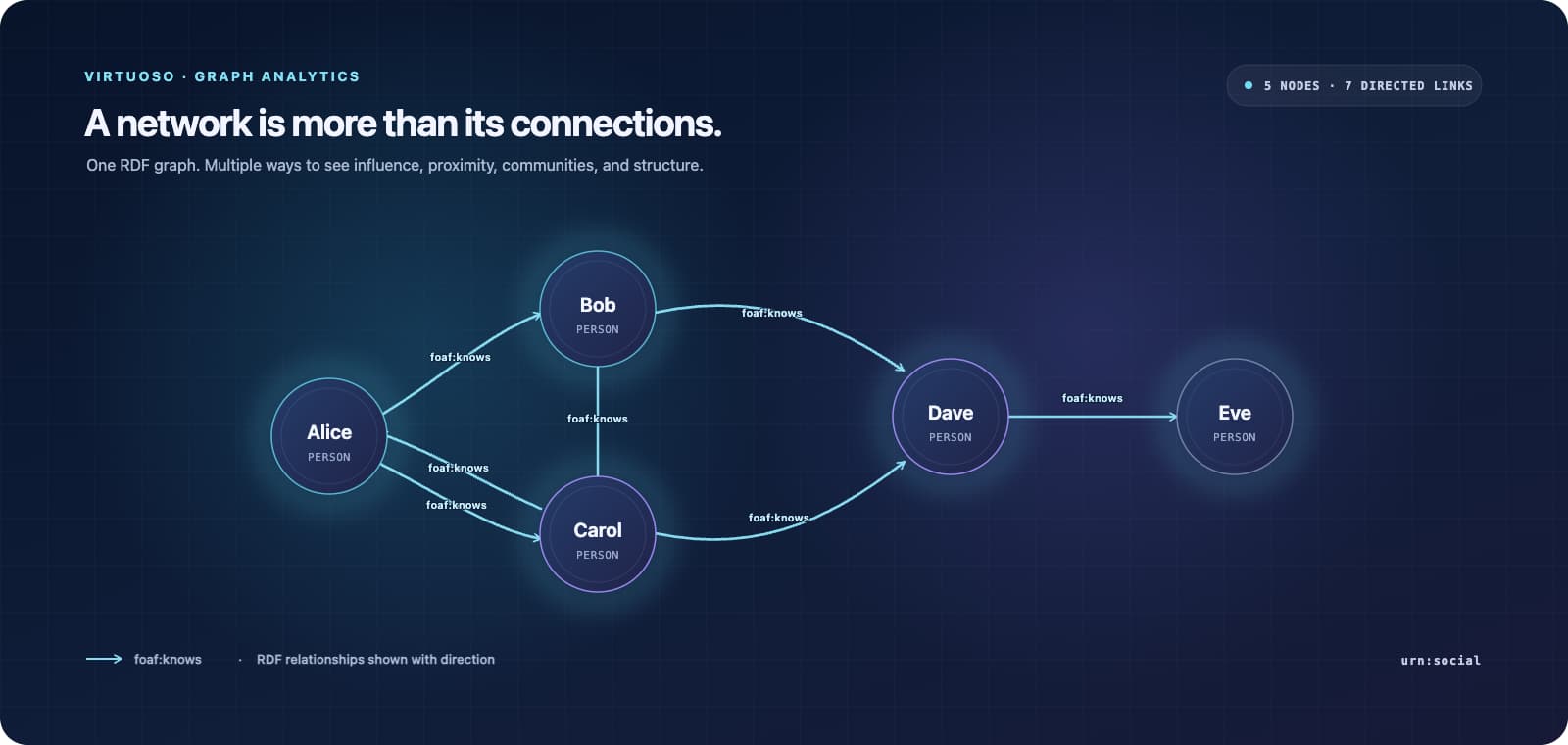
A knowledge graph can tell you that two people know each other. Graph analytics helps answer the next questions: Who is most influential? Which people connect otherwise separate groups? Where are the tightly connected communities? How many relationships surround each person?
Virtuoso brings those questions into the SPARQL query workflow. These examples apply graph analytics functions to a FOAF social network in the urn:social graph, returning scores, rankings, and component assignments as query results. Analysts can explore the structure of RDF data using the relationships already represented in the graph.
This newer engine approach replaces Virtuoso’s earlier SPARQL-BI extension based approach to graph analytics, covered in this 2019 Virtuoso graph analytics overview. The examples below show graph analytics functions directly in SPARQL queries.
Rank by influence, with or without weights
Basic PageRank ranks people by the structure of links in the network. This query orders results by score and limits the output to the top ten.
Basic PageRank
# Top 10 by PageRank
PREFIX foaf: <http://xmlns.com/foaf/0.1/>
PREFIX bif: <http://www.openlinksw.com/schemas/bif#>

SELECT ?node ?rank
FROM <urn:social>
WHERE {
?node foaf:knows ?other .
?node bif:pagerank ?rank .
}
ORDER BY DESC(?rank)
LIMIT 10
PageRank parameters are also settable in the query. This example specifies a damping factor of 0.9 and a maximum of 500 iterations.
PageRank with damping and other parameters
PREFIX foaf: <http://xmlns.com/foaf/0.1/>
PREFIX bif: <http://www.openlinksw.com/schemas/bif#>

SELECT ?node ?rank
FROM <urn:social>
WHERE {
?node foaf:knows ?other .
?node bif:pagerank ?rank
OPTION (damping 0.9, max_iter 500) .
}
ORDER BY DESC(?rank)
The first weighted example passes an annotation value to PageRank through the weight option.
Weighted PageRank via RDF 1.2 Annotations
PREFIX : <#>
PREFIX foaf: <http://xmlns.com/foaf/0.1/>
PREFIX bif: <http://www.openlinksw.com/schemas/bif#>

SELECT DISTINCT ?person ?rank
FROM <urn:social>
WHERE {
?person (foaf:knows|^foaf:knows) ?other .
?person bif:pagerank ?rank OPTION (weight :weight) .
}
ORDER BY DESC(?rank)
A second weighted example makes the annotation part of the relationship pattern itself, showing how a weight can be expressed directly alongside the foaf:knows triple.
Weighted PageRank with an inline RDF 1.2 annotation
PREFIX : <#>
PREFIX foaf: <http://xmlns.com/foaf/0.1/>
PREFIX bif: <http://www.openlinksw.com/schemas/bif#>

SELECT DISTINCT ?person1 ?rank
FROM <urn:social>
WHERE {
?person1 foaf:knows ?person2 {| :weight ?weight |} ;
bif:pagerank ?rank OPTION (weight :weight) .
}
ORDER BY DESC(?rank)
Ask what “central” means
There is no single definition of an important node. These centrality queries offer different views of the same network.
Degree centrality counts a node’s connections. The example uses the default behavior, which considers both directions.
Degree Centrality
# Degree of each node (both directions by default)
PREFIX foaf: <http://xmlns.com/foaf/0.1/>
PREFIX bif: <http://www.openlinksw.com/schemas/bif#>

SELECT DISTINCT ?node ?deg
FROM <urn:social>
WHERE {
?node foaf:knows ?other .
?node bif:degree_centrality ?deg .
}
ORDER BY DESC(?deg)
Betweenness centrality highlights nodes that lie on paths between other nodes. This query requests normalized scores.
Betweenness Centrality
PREFIX foaf: <http://xmlns.com/foaf/0.1/>
PREFIX bif: <http://www.openlinksw.com/schemas/bif#>

SELECT ?node ?score
FROM <urn:social>
WHERE {
?node foaf:knows ?other .
?node bif:betweenness ?score
OPTION (normalized 1) .
}
ORDER BY DESC(?score)
Closeness centrality ranks nodes by their proximity to others in the network.
Closeness Centrality
PREFIX foaf: <http://xmlns.com/foaf/0.1/>
PREFIX bif: <http://www.openlinksw.com/schemas/bif#>

SELECT ?node ?score
FROM <urn:social>
WHERE {
?node foaf:knows ?other .
?node bif:closeness ?score .
}
ORDER BY DESC(?score)
Eigenvector centrality scores nodes in relation to the importance of their neighbors. The query makes its iteration and tolerance settings explicit.
Eigenvector Centrality
PREFIX foaf: <http://xmlns.com/foaf/0.1/>
PREFIX bif: <http://www.openlinksw.com/schemas/bif#>

SELECT ?node ?score
FROM <urn:social>
WHERE {
?node foaf:knows ?other .
?node bif:eigenvector ?score
OPTION (max_iter 200, tolerance 0.00001) .
}
ORDER BY DESC(?score)
Together, these measures let analysts compare several kinds of prominence: connection count, path brokerage, proximity, and connection to other influential nodes.
Find components, communities, and triangles
Centrality scores describe individual nodes. These queries help describe how the network is organized.
Weakly connected components (WCC) group nodes connected when edge direction is disregarded.
Weakly Connected Components (WCC)
# Group nodes by WCC component
PREFIX foaf: <http://xmlns.com/foaf/0.1/>
PREFIX bif: <http://www.openlinksw.com/schemas/bif#>

SELECT ?node ?comp
FROM <urn:social>
WHERE {
?node foaf:knows ?other .
?node bif:wcc ?comp .
}
ORDER BY ?comp
Strongly connected components (SCC) identify groups in which directed paths connect the members.
Strongly Connected Components (SCC)
PREFIX foaf: <http://xmlns.com/foaf/0.1/>
PREFIX bif: <http://www.openlinksw.com/schemas/bif#>

SELECT ?node ?comp
FROM <urn:social>
WHERE {
?node foaf:knows ?other .
?node bif:scc ?comp .
}
ORDER BY ?comp
Louvain community IDs group nodes into detected communities.
Community ID (Louvain)
PREFIX foaf: <http://xmlns.com/foaf/0.1/>
PREFIX bif: <http://www.openlinksw.com/schemas/bif#>

SELECT ?node ?community
FROM <urn:social>
WHERE {
?node foaf:knows ?other .
?node bif:community_id ?community .
}
ORDER BY ?community
Triangle counts show how many closed three-node patterns include each node, indicating local clustering.
Triangles
PREFIX foaf: <http://xmlns.com/foaf/0.1/>
PREFIX bif: <http://www.openlinksw.com/schemas/bif#>

SELECT ?node ?community
FROM <urn:social>
WHERE {
?node foaf:knows ?other .
?node bif:community_id ?community .
}
ORDER BY ?community
Graph analysis as part of the query
The practical point is the workflow: describe relationships as RDF, select the graph, and ask analytical questions in SPARQL. Results stay in the query environment, where analysts can sort, filter, combine, and build on scores and groupings alongside the underlying RDF patterns.
That approach is relevant to knowledge graphs, where relationships are already represented as data rather than isolated application-specific edges. It keeps the network model inspectable and queryable, while letting analysis stay close to the entities and predicates that business users recognize.
Virtuoso’s development notes identify version 7.2.18 as unreleased and list RDF 1.2 triple-term support among the SPARQL work. This article complements those notes with a practical view of graph analytics in action: from RDF relationships, through SPARQL, to rankings and structural insights. (Virtuoso development notes)
The live examples use the demo service and its urn:social dataset. Results and availability depend on that service and graph.