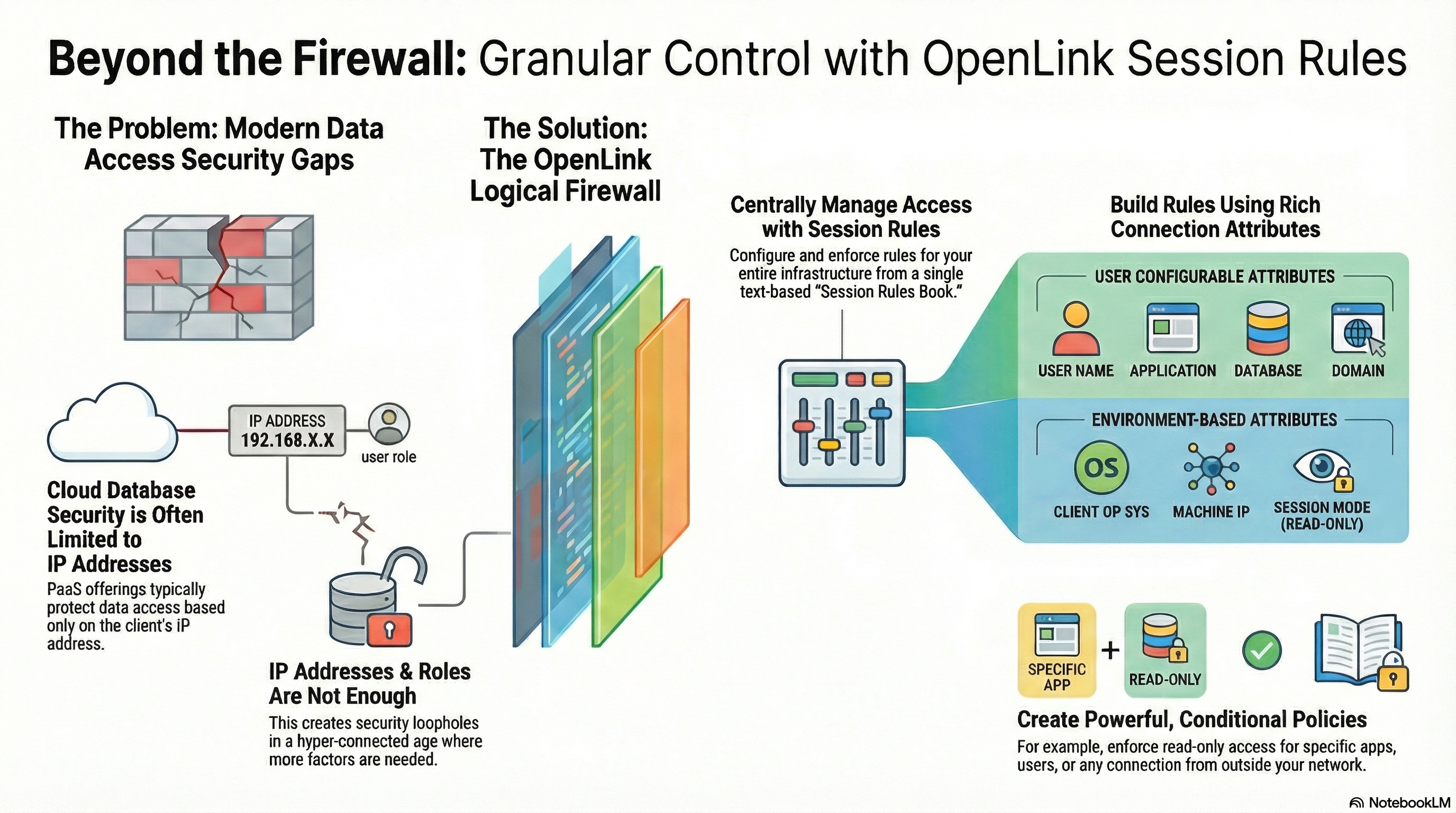
ODBC and JDBC drivers (connectors) are typically bundled with DBMS installations. By design, these drivers are minimalist: they focus almost exclusively on connectivity, with little to no consideration for data privacy or security. In the age of AI—and especially AI agents—this limitation compounds dramatically, as machines now access data continuously, autonomously, and at scale.
OpenLink’s Multi-Tier connectors were designed specifically to address this reality. They introduce fine-grained, attribute-based access controls (ABAC) enforced through a centrally managed Request Broker. Rather than treating every connection as equivalent, access decisions are made by evaluating rich client and environmental attributes—including operating system, application identity, IP address, username, target DBMS, and additional user-configurable attributes.
Any combination of these attributes can be evaluated at runtime to construct a logical firewall that precisely constrains which read or read–write operations are permitted when access occurs via ODBC or JDBC applications, services, or AI agents.
In modern hybrid and cloud environments such as AWS and Azure, database security is still commonly reduced to IP address whitelisting combined with native database roles. This approach is fundamentally flawed in an AI-driven world. IP addresses are transient, shared, and largely meaningless when agents, services, and tools act on behalf of users across dynamic infrastructure.
The core issue is that IP addresses and database roles represent only a small fraction of the context required to make trustworthy access decisions. In the age of autonomous agents, security must account for who is connecting, what software or agent is making the request, from where, and under which conditions—before any data is touched.
This is where a logical firewall becomes essential: a policy-driven control plane that uses a rich set of attributes to enforce context-aware, least-privilege access before a connection ever reaches the database.
Here are five surprising ways this approach enables stronger, more adaptive control over your data in the age of AI.
 Direct access: Link
1. Go Beyond the IP Address: Build a “Logical Firewall”
The fundamental limitation of many cloud service providers’ security is that their firewall protections are often only scoped to client IP addresses. This is a blind spot. A user’s identity is more than their network location; it includes the application they’re using, their operating system, and the specific permissions they require for a given task.
A “Logical Firewall” creates rich data access profiles by combining these multiple attributes, such as the connecting Application, the user’s OpSys, their User name, and their Machine IP address. Instead of a simple allow/deny rule based on an IP, you can build declarative policies that evaluate the full context of a connection request. OpenLink’s drivers provide this capability through a centralized, text-based rules engine.
Our Multi-Tier Data Access Drivers, provide a Logical Firewall capability that processes Session Rules described in its Session Rules Book where Session Rules are stored and maintained in a text based Initialization File (“oplrqb.ini”).
2. Control Which Applications Get Read-Write Access
You’ve meticulously configured user roles, believing your data is safe. The surprise? A user with write access can still wreak havoc using an insecure tool like Microsoft Access. The real control lies in dictating how they connect, not just who is connecting.
This is where your Logical Firewall provides a surprising layer of defense that database-native security can’t. Using the Application connection attribute, it can identify the specific client application making the request. For example, a rule can target any connection where the application identifies as ^MSACCESS$ (a regular expression that precisely matches ‘MSACCESS’ from start ^ to finish $) and automatically demote its session to read-only. This prevents users from making accidental or malicious changes from that specific tool.
This moves security from a static, role-based model to a dynamic, context-aware policy. It’s the difference between checking a driver’s license once and continuously monitoring their driving behavior.
3. Differentiate Between an Office Worker and a Remote Worker
Your Logical Firewall can instantly assess the trust level of a connection’s origin, solving a key challenge for today’s hybrid workforce. Imagine you need to grant full read-write access to employees on the corporate LAN while restricting remote connections to read-only.
You can enforce this distinction with a simple session rule that interrogates the Machine attribute. First, an administrator creates two agent templates: one for full read-write access and another restricted to read-only. The session rule then acts as a traffic cop. Because the Request Broker processes rules in ascending order, you place a specific rule first that routes connections from the corporate IP range (e.g., 123.123.123.*) to the read-write agent. A second, more general catch-all rule is placed after it, ensuring any connection that doesn’t match the internal IP range is defaulted to the secure, read-only agent.
This enables a zero-trust posture for external connections by default, drastically reducing the attack surface without burdening internal users or requiring complex VPN configurations for simple data access.
4. Use Rules to Manage Performance and Reduce Server Load
A truly intelligent Logical Firewall doesn’t just manage security—it manages system health. Beyond security, session rules also give you the power to proactively manage server performance and optimize the consumption of operating system resources. Each database agent instance consumes resources, and having too many running simultaneously can strain the system.
Using the ReUse attribute in an agent configuration, you can control how agent processes are shared. To maximize resource savings, an administrator can set a rule to unconditionally share a single agent instance (Always) across numerous clients. For a more balanced approach, the rule can be set to conditionally share an agent, such as spawning “one OpenLink Agent instance is spawned per OpenLink Client machine.” This provides granular control over resource pooling, helping to tune the system in line with operating system constraints.
5. Achieve Centralized, Declarative Control Over Your Entire Infrastructure
One of the greatest benefits of this approach is its role as the central control plane for your entire Logical Firewall. All of these powerful, granular policies are stored and maintained in a single, text-based “Session Rules Book” (oplrqb.ini).
This centralized, declarative model is a force multiplier for DataOps and security teams. It eliminates configuration drift, provides a single source of truth for audits, and allows policies to be updated and deployed in minutes, not days. This stands in stark contrast to the complexity of managing scattered configuration settings across different servers, applications, and database engines.
The security and configuration control attributes of the session rules book is OpenLink’s single most important and distinguishing feature when compared with other data access technologies (standards or non standards based).
Conclusion
Effective data access control in the modern enterprise requires moving beyond simplistic, IP-based rules. By adopting an intelligent, attribute-based policy system, you can build a layered defense that is more secure, flexible, and easier to manage. This approach allows you to control not just who is connecting, but from where, with what application, and under what conditions.
Now that you know what’s possible, are you still comfortable letting a single IP address be your only gatekeeper?
Drivers / Connectors Collection
Supported Databases
| Database | ODBC Driver | JDBC Driver |
|---|---|---|
| Oracle | ODBC | JDBC |
| SQL Server | ODBC | JDBC |
| MySQL | ODBC | JDBC |
| PostgreSQL | ODBC | JDBC |
| IBM DB2 | ODBC | JDBC |
| Informix | ODBC | JDBC |
| Sybase | ODBC | JDBC |
| Progress | ODBC | JDBC |
| Ingres | ODBC | JDBC |
Bridge Drivers
| Bridge Driver Name | Link |
|---|---|
| ODBC-to-JDBC Bridge | View Driver |
| ODBC-to-ODBC Bridge | View Driver |
| JDBC-to-ODBC Bridge | View Driver |
| JDBC-to-JDBC Bridge | View Driver |