I am connecting to Virtuoso from a web application using a SPARQL endpoint.
I would like to set up basic authentication for that endpoint for information security purposes.
How can I do this?
environment
Version 07.20.3240-threads for Win64 as of Nov 11 2024 (ffed4676d)
OS:Windows 11
See this document on the Virtuoso default digest authentication ~/sparql-auth endpoint and also how the default ~/sparql endpoint can be Secured via SQL Accounts with digest authentication, as the ~/sparql-auth endpoint is.
Thank you for your reply. I try it.
@hwilliams
After setting up the method I was taught, the authentication request window now appears on the SPARQL Endpoint screen.
However, when I tried connecting to ~/sparql endpoint from another web application, I encountered a CORS error.
I have set the Cross-Origin Resource Sharing (CORS) policy to * for Conductor console(Web Application Server > Virtual Domeins & Directories > Port 8890 > /sparql).
How can I configure Cross-Origin Resource Sharing for an authenticated SPARQL endpoint?
What is the actual CORS error being encountered, as you seem to indicate have set the Cross-Origin Resource Sharing to * to allow access from any web application, as detailed in this Setting up server-side Cross-Origin Resource Sharing (CORS) with Virtuoso document ?
@hwilliams thank you for your response.
Yes I set up server-side Cross-Origin Resource Sharing (CORS) with Virtuoso document.
The situation is as follows.
My explanation in the previous message was not accurate.
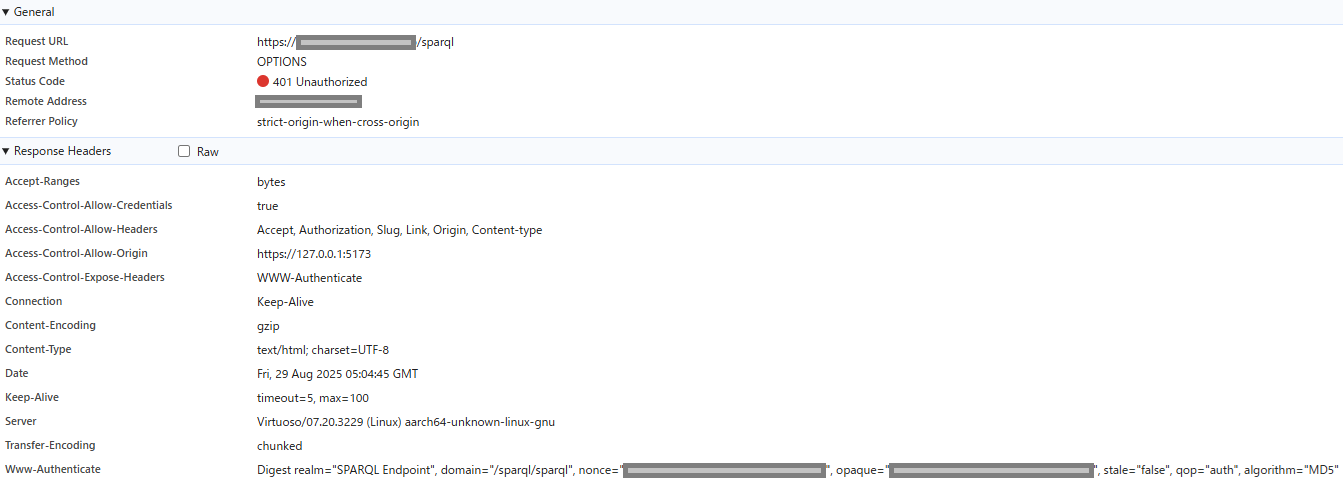
Correctly, the preflight request when connecting to the SPARQL Endpoint is returning a 401 Unauthorized error. This is followed by a CORS error.
When connecting to the SPARQL endpoint from a web application running in Google Chrome,
the response returned is as shown in the attached image.
Additionally, when testing with curl for troubleshooting purposes, the following response resulted in a 401 Unauthorized error:
curl -X OPTIONS -I -u userName:Password -H "Origin: https://127.0.0.1:5173/" https://XXX.XXX.XXX.XX.XX
HTTP/1.1 401 Unauthorized
Date: Fri, 29 Aug 2025 04:41:39 GMT
Server: Virtuoso/07.20.3229 (Linux) aarch64-unknown-linux-gnu
Content-Type: text/html; charset=UTF-8
Allow: GET,HEAD,POST,OPTIONS
Access-Control-Allow-Origin: https://127.0.0.1:5173/
Access-Control-Allow-Credentials: true
Access-Control-Allow-Headers: Accept, Authorization, Slug, Link, Origin, Content-type
Accept-Ranges: bytes
Content-Length: 0
Where is the CORS error as I don’t see one in any of your output ?
The error occurring is 401 Unauthorized as the authentication has failed. By default Virtuoso uses digest authentication, which needs to be specified when making the connection from a third party application. Thus for curl you need to specify the --digest option to use digest authentication, which should then produce something like:
$ curl -X OPTIONS -H "Origin: localhost" -I --digest -u dba:dba  http://spike:8890/sparql-auth
HTTP/1.1 401 Unauthorized
Server: Virtuoso/07.20.3238 (Linux) x86_64-ubuntu_noble-linux-glibc2.39-64  VDB
Connection: close
Content-Type: text/html; charset=UTF-8
Date: Fri, 29 Aug 2025 10:16:54 GMT
Accept-Ranges: bytes
WWW-Authenticate: Digest realm="SPARQL", domain="/sparql-auth", nonce="5632666fb68c721007a0c8ccfd9d3455", opaque="5ebe2294ecd0e0f08eab7690d2a6ee69", stale="false", qop="auth", algorithm="MD5"
Content-Length: 0

HTTP/1.1 204 No Content
Server: Virtuoso/07.20.3238 (Linux) x86_64-ubuntu_noble-linux-glibc2.39-64  VDB
Connection: Keep-Alive
Allow: GET,HEAD,POST,OPTIONS,TRACE
Date: Fri, 29 Aug 2025 10:16:54 GMT
X-Powered-By: Virtuoso Universal Server 07.20.3238
DAV: 1,2,<http://www.openlinksw.com/virtuoso/webdav/1.0>
Access-Control-Allow-Methods: COPY, DELETE, GET, HEAD, LOCK, MOVE, MKCOL, OPTIONS, PATCH, POST, PROPFIND, PROPPATCH, PUT, TRACE, UNLOCK
MS-Author-Via: SPARQL
@hwilliams
Thank you for your reply.
I will configure the digest authentication option and try the command.
It’s possible that the comunica library I’m using might not support digest authentication and only allows basic authentication.
In that case, I need to change the SPARQL endpoint settings to Basic authentication.
On the Secure SPARQL Endpoint Guide via SQL Accounts -- usage path digest authentication page,
under the “Authentication options” section, apply the following settings:
Can I achieve this by changing the Method from Digest to Basic?
Yes, you can change the Authentication method from none or digest to basic in the drop down list box to use basic authentication, on the Virtual Directory setup page.
@hwilliams thank you! I understand.
The curl command I was given did indeed return a 204 No Content response indicating CORS permission.
However, digest authentication using the digest-fetch library embedded in my web application did not work.
digest-fetch sends the preflight OPTIONS request without any credentials, as per the CORS specification. However, it receives a 401 Unauthorized response, causing it to fail the preflight check and result in a CORS error determination.
Is there a way to configure the server to respond to the OPTIONS request sent during the CORS preflight with a 200 OK or 204 No Content status and the appropriate Access-Control-Allow-* headers, without requiring authentication?
I created the following procedure by customizing DB.DBA.HP_AUTH_SQL_USER and attempted to register it as the Authentication Function for the SPARQL endpoint. However, when I launched Interactive SQL from the conductor and executed it, I encountered an error and was unable to successfully register the procedure.
CREATE PROCEDURE DB.DBA.my_custom_sparql_auth (
    IN username VARCHAR,
    IN password VARCHAR,
    IN request_path VARCHAR,
    IN method VARCHAR,
    IN auth_realm VARCHAR)
{
  if (method = 'OPTIONS') {
    -- For OPTIONS requests, always allow authentication.
    return 1;
  }
  -- For requests other than OPTIONS, call the existing authentication function.
  return DB.DBA.HP_AUTH_SQL_USER(username, password, request_path, method, auth_realm);
};
The part where it says “IN password VARCHAR” seems to be causing an error.
I thought you wanted to use basic authentication, but now you indicate your web app is using digest fetch authentication, is this documented anywhere online ?
When you say being unable to successfully register the procedure where is this failure occurring and is this when creating the procedure in Virtuoso, as if I attempt to create it, this fails with a syntax error:
SQL> CREATE PROCEDURE DB.DBA.my_custom_sparql_auth (
DB.DBA.my_custom_sparql_auth(0)     IN username VARCHAR,
DB.DBA.my_custom_sparql_auth(0)     IN password VARCHAR,
DB.DBA.my_custom_sparql_auth(0)     IN request_path VARCHAR,
DB.DBA.my_custom_sparql_auth(0)     IN method VARCHAR,
DB.DBA.my_custom_sparql_auth(0)     IN auth_realm VARCHAR)
DB.DBA.my_custom_sparql_auth(0) {
DB.DBA.my_custom_sparql_auth(1)   if (method = 'OPTIONS') {
DB.DBA.my_custom_sparql_auth(2)     -- For OPTIONS requests, always allow authentication.
DB.DBA.my_custom_sparql_auth(2)     return 1;
DB.DBA.my_custom_sparql_auth(2)   }
DB.DBA.my_custom_sparql_auth(1)   -- For requests other than OPTIONS, call the existing authentication function.
DB.DBA.my_custom_sparql_auth(1)   return DB.DBA.HP_AUTH_SQL_USER(username, password, request_path, method, auth_realm);
DB.DBA.my_custom_sparql_auth(1) };

*** Error 37000: VD [Virtuoso Server]SQ074: Line 1 (line 1 of "(console)"): syntax error
in lines 1-14 of Top-Level:
#line 1 "(console)"
CREATE PROCEDURE DB.DBA.my_custom_sparql_auth (     IN username VARCHAR,      IN password VARCHAR,      IN request_path VARCHAR,      IN method VARCHAR,     IN auth_realm VARCHAR) {   if (method = 'OPTIONS') {     -- For OPTIONS requests, always allow authentication.     return 1;   }   -- For requests other than OPTIONS, call the existing authentication function.   return DB.DBA.HP_AUTH_SQL_USER(username, password, request_path, method, auth_realm); }
SQL>
I apologize for the lack of explanation.
Initially, I was considering using basic authentication.
However, after you pointed me to the page
https://vos.openlinksw.com/owiki/wiki/VOS/VirtSPARQLProtectSQLDigestAuthentication
I learned about the option of Digest authentication, which offers a higher security level.
Therefore, I’ve changed my goal: my first priority is to implement Digest authentication, and my second priority is to implement Basic authentication. I’m currently exploring these options.
I also encountered the following syntax error when creating a procedure in Virtuoso.
This is just a guess, but it might be because “password” is a reserved word causing the error.
SQLState: 37000
Message: SQ074: Line 3: syntax error
 CREATE PROCEDURE DB.DBA.my_custom_sparql_auth (
    IN username VARCHAR,
    IN password VARCHAR,
    IN request_path VARCHAR,
    IN method VARCHAR,
    IN auth_realm VARCHAR)
{
  if (method = 'OPTIONS') {
    -- For OPTIONS requests, always allow authentication.
    return 1;
  }
  -- For requests other than OPTIONS, call the existing authentication function.
  return DB.DBA.HP_AUTH_SQL_USER(username, password, request_path, method, auth_realm);
}
@shunsuke-kato The syntax error is due to password being a reserved word, thus you need to change it to something else like pwd or other that is not a keyword.
After implementing the following three steps, the preflight request for Digest authentication now returns a 200 OK response.
-
Created a customized Virtuoso PL for DB.DBA.HP_AUTH_SQL_USER. Registered it using Interactive SQL.
(For options requests, it returns 1; for all others, it processes via DB.DBA.HP_AUTH_SQL_USER)
(Referenced the page at https://docs.openlinksw.com/virtuoso/ch-webappdevelopment/)
-
Executing SPARQL Update queries through an OAuth-protected Virtuoso SPARQL endpoint I configured it as described on the page.
-
Secure SPARQL Endpoint Guide via SQL Accounts -- usage path digest authentication
I configured it as described on the page. I changed the following items:
- Method to: Digest;
- Authentication Function: The customized Virtuoso PL registered in 1).
As a result, my application can now connect to Virtuoso using Digest authentication.
Thank you for teaching me how to do this.